On this page
TL;DR
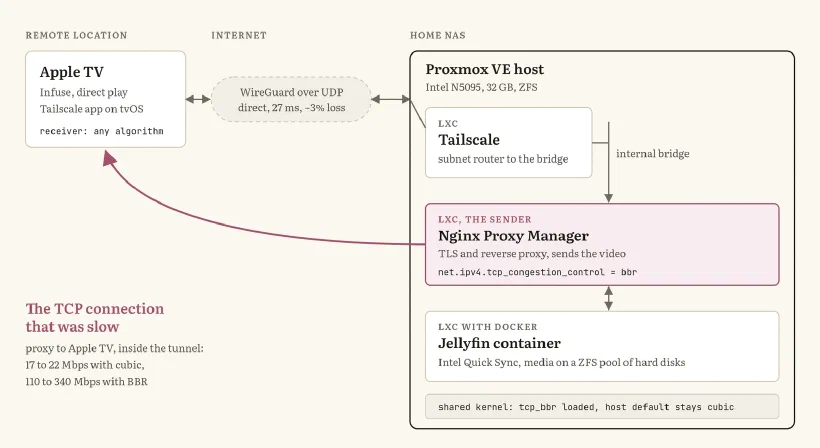
My Jellyfin server streams to an Apple TV in another city over Tailscale, and 4K files kept stalling. The tunnel was fine: a single TCP connection to the Apple TV crawled at 17 to 22 Mbps because the path drops about 3% of packets, and CUBIC, the default Linux congestion control, reads every loss as congestion. Switching only the reverse proxy container to BBR took the same connection to 110 to 340 Mbps. One kernel module on the host, one sysctl in one container, no restart.
Introduction
It was a Sunday evening. I was on the couch, with my phone, and my Apple TV was stuttering on a 4K movie streamed from my NAS, which sits in another city.
My theory was the CPU: a small Intel N5095 that could not keep up transcoding some big 4K files. I opened a Claude Code Remote Control session on my workstation from the phone and told the agent to investigate: first the Proxmox host, then the container where Jellyfin runs. About fifteen minutes later the stream was smooth, the fix was persistent and committed to the repository that holds the NAS configuration.
This post is about what it found, because the answer is not where I expected it, and it applies to anyone serving video, backups or large files over a VPN with some packet loss on the way.
The setup
The NAS is a small Proxmox VE box with an Intel N5095, 32 GB of RAM and ZFS. Everything runs in LXC containers, which share the host kernel:
- Tailscale: a container that joins my tailnet and acts as a subnet router towards an internal bridge.
- Nginx Proxy Manager: the reverse proxy, which terminates TLS and forwards each request to the right service. This is the container that sends the video to the client.
- Jellyfin: a Docker container inside an LXC container, with Intel Quick Sync for transcoding and the media on a ZFS pool of hard disks.
The client is Infuse on an Apple TV in a remote location, with the Tailscale app installed on the Apple TV itself.
A primer on TCP congestion control
Before the investigation, a little background, because the whole story is about it.
TCP does not know how fast the path between two machines is. The congestion control algorithm guesses: it decides how much data can be in flight, unacknowledged, at any moment. That amount is the congestion window, and divided by the round trip time it gives the speed of the connection. With a 30 millisecond round trip, a window of 60 packets of 1,228 bytes is about 20 Mbps, no matter how fast the lines at either end are.
On Linux, congestion control is a pluggable kernel module. You can see what is loaded and what is in use:
sysctl net.ipv4.tcp_available_congestion_control
# net.ipv4.tcp_available_congestion_control = reno cubic

sysctl net.ipv4.tcp_congestion_control
# net.ipv4.tcp_congestion_control = cubic
Three names are worth knowing:
- Reno: the classic algorithm. It grows the window by one packet per round trip and halves it on every loss.
- CUBIC: the default in Linux, Windows and Apple systems, standardized as RFC 9438. It grows the window along a cubic curve, so it recovers faster on fast, long links. But it is still loss based: a lost packet means congestion, and the window shrinks.
- BBR (Bottleneck Bandwidth and Round-trip propagation time): published by Google in 2016 and in Linux since 4.9. It does not treat loss as the signal. It keeps measuring the delivery rate and the minimum round trip time, and paces its sending to match the bandwidth it has observed.
The difference shows up on paths with random loss that is not caused by congestion: Wi-Fi, mobile networks, long routes across providers, a tunnel over UDP. There CUBIC keeps cutting its window for losses that have nothing to do with a full queue, and never reaches the speed the path could give. Google reported a 4% average throughput gain for YouTube globally, and more than 14% in some countries, when it moved its servers to BBR.
BBR only needs to change on the sender. The receiver, my Apple TV, does not need to know anything about it.
The investigation
The agent started from the server and moved outwards, ruling things out one at a time:
Not the CPU. My theory was wrong from the first check. Infuse was using direct play, so nothing was transcoded: Jellyfin was sending the file as it is, a 22.5 GB HEVC Main10 file with Dolby Vision, about 25 Mbps on average and well above that in the 4K peaks.
Not the NAS. CPU and disks were idle, and the NAS uplink measures about 900 Mbps. Jellyfin had data queued in the socket, waiting to go out: the server was faster than the network.
Not a relay. This was my first suspect. Tailscale tries to connect devices directly, punching through NAT, and when that fails it falls back to a DERP relay, which adds latency and caps throughput to stay fair to everyone.
tailscale pingshows which one you get:bashtailscale ping apple-tv # pong from apple-tv (100.x.y.z) via <public ip>:40323 in 27msvia <ip>:<port>is a direct connection. A relayed one saysvia DERP(...).Not the tunnel. A single TCP stream from the NAS to my workstation, over the same Tailscale setup, ran at 567 to 672 Mbps, with SSH encryption on top.
What was left was one TCP connection: the one from Nginx Proxy Manager to the Apple TV. ss -tni on the proxy container shows the kernel’s view of every socket, and this one was clear:
cubic ... rtt:30.765/1.382 mss:1228 cwnd:68 ssthresh:46 bytes_retrans:8596
          bytes_acked:20114394 delivery_rate 22071960bps
A congestion window of 68 packets at a 30 millisecond round trip: about 22 Mbps, below the average bitrate of the file. The player drains its buffer faster than the network fills it, and the movie stops.
How the agent measured it
No benchmark tool was installed on the NAS, and the agent did not install one. It used what was already there, in two ways.
The tunnel, with SSH and random bytes. To know whether Tailscale itself was slow, it pulled 300 MB of random data from the NAS to my workstation over the tailnet, and timed it:
s=$(date +%s.%N)
ssh -c aes128-gcm@openssh.com nas 'head -c 300000000 /dev/urandom' | wc -c
e=$(date +%s.%N)
python3 -c "print(f'{300e6*8/($e-$s)/1e6:.0f} Mbps')"
# 567 Mbps
# 672 Mbps
Random data cannot be compressed on the way, and AES-GCM is cheap on modern CPUs, so the number is close to what one TCP connection through the tunnel can carry. Two runs, 567 and 672 Mbps: the tunnel was not the problem.
The real stream, from the kernel. A synthetic test says what the path can do, not what the player gets. So the agent read the live socket instead, from inside the proxy container, while the movie was playing:
pct exec 102 -- sh -c 'for i in 1 2 3 4; do
  ss -tni state established "( sport = :443 )" \
    | grep -E "bytes_sent:[0-9]{7,}" \
    | grep -o -E "rtt:[^ ]+|cwnd:[0-9]+|bytes_retrans:[0-9]+|delivery_rate [^ ]+"
  sleep 3
done'
ss -tni prints what the kernel knows about each TCP connection: the algorithm, the round trip, the congestion window, the bytes retransmitted and the delivery rate, the speed the receiver is actually acknowledging. The bytes_sent filter keeps only the connection carrying megabytes, the video, and skips the small API calls next to it. Sampling every few seconds turns it into a cheap time series. The same loop, after the switch to BBR, gave the numbers further down.
Why CUBIC was stuck
The path to the remote location loses packets. Later, with BBR, about 3% of the data had to be retransmitted. CUBIC never pushes the path that hard. Each loss cuts the window, the window never grows past a few dozen packets, and the connection settles at a fraction of what the path can carry.
That also explains the confusion. Tailscale looked guilty because the slow connection was the one inside the tunnel, but the tunnel was carrying everything it was asked to. The problem was how the sender reacted to a lossy path.
The fix, one container at a time
LXC containers share the host kernel, but each container has its own network namespace, and the congestion control setting is per namespace. That means BBR can be turned on for the proxy, the container that sends the video, and nowhere else.
Loading the module only makes BBR available. The host default stays CUBIC, so SSH and the Tailscale container are untouched.
An unprivileged container cannot load kernel modules, so the module goes on the host first:
# On the Proxmox host
modprobe tcp_bbr

# In the proxy container (CT 102 here)
pct exec 102 -- sysctl -w net.ipv4.tcp_congestion_control=bbr
No restart is needed. The setting applies to new connections, and Infuse opens new ones all the time, so stopping and starting the movie was enough. BBR also ran fine on the existing fq_codel queue.
Then the same ss -tni loop again, on the same kind of socket. Side by side, before and after:
ss -tni field | CUBIC | BBR |
|---|---|---|
rtt | 30.8 ms | 35.4 ms |
cwnd (packets) | 68 | 3,256 |
bytes_acked | 20.1 MB | 168.1 MB |
bytes_retrans | 8.6 kB (0.04%) | 5.3 MB (3.1%) |
delivery_rate | 22.1 Mbps | 112.9 Mbps |
pacing_rate | not set | 337.2 Mbps |
A window almost 50 times larger, about 168 MB delivered in 25 seconds, and smooth playback. The round trip barely moved: the path was the same, only the sender’s behaviour changed. The delivery rate in a single sample swings a lot with BBR, between 88 and 343 Mbps across the four samples, which is why the chart below uses the median.
To make it survive a reboot, two files:
# Host: load the module at boot
echo tcp_bbr > /etc/modules-load.d/bbr.conf

# Proxy container: use BBR
echo net.ipv4.tcp_congestion_control=bbr > /etc/sysctl.d/90-bbr.conf
Rolling back is one command: sysctl -w net.ipv4.tcp_congestion_control=cubic in the container.
The numbers
Every number below comes from ss -tni on the same socket, sampled every few seconds while the movie played: twice with CUBIC, four times with BBR. They are samples from one evening on one path, not a benchmark.
The price is visible too. BBR keeps sending through loss, so it retransmits more:
How to apply it to your network
- Check the path first. Run
tailscale pingto the client. If it goes through DERP, fix NAT traversal before anything else, or look at peer relays. - Measure one connection, not the line.
ss -tnion the sender shows the algorithm, the congestion window, the round trip and the delivery rate of each socket. A small window and some retransmissions on a fast line point at congestion control. - Change the sender only. Load
tcp_bbron the host and enable it in the container that serves the traffic, often the reverse proxy. The rest of the host keeps CUBIC. - Test with new connections, then make it persistent with
/etc/modules-load.d/on the host and/etc/sysctl.d/in the container, and commit both files wherever you keep your configuration.
Conclusion
What surprised me was not BBR. It was that the first analysis was correct, and how much knowledge of networks and operating systems sat behind it. This is the work of a Linux network engineer, and in any other scenario it would have taken me hours, or days. Here it took one Remote Control session from the couch.
If you have questions or just want to talk about TCP, Tailscale or homelabs, just drop me a message here.