On this page
TL;DR
In one long session, with AI agents writing the code, this blog got its own theme built on Edward Tufte’s design principles, charts drawn from data, faster pages, an accessibility pass, a security review for a public repository, and a new Links section that fills itself from Slack. I steered, tested and decided; the agents did the rest. Every change is a public pull request in the repository.
Introduction
In my first post, back in 2022, I promised to keep the nerd side of me from wasting time on techy stuff and to focus on writing. You can guess how that went: eleven posts in four years , and a lot more time spent on the stack than on the words.
This time I had a different reason to open the code. I was very curious about the design capabilities of the new Anthropic models, Opus 5.5 in this case. I love Tufte’s design principles, and I wanted to clean up the stack and improve speed and accessibility. Mostly, I wanted to experiment: test what these models can do now, and use the blog for content and ideas instead of the stack, which is now entirely in the hands of my agents.
So the goal was simple: a site I like reading, that I never have to touch again.
A theme of my own
The blog ran on hugo-coder for years, with a layer of my own CSS on top, the “Large Print” design from August. The first thing the agent did was not code: it drew three directions as mockups, each one a different take on Tufte.
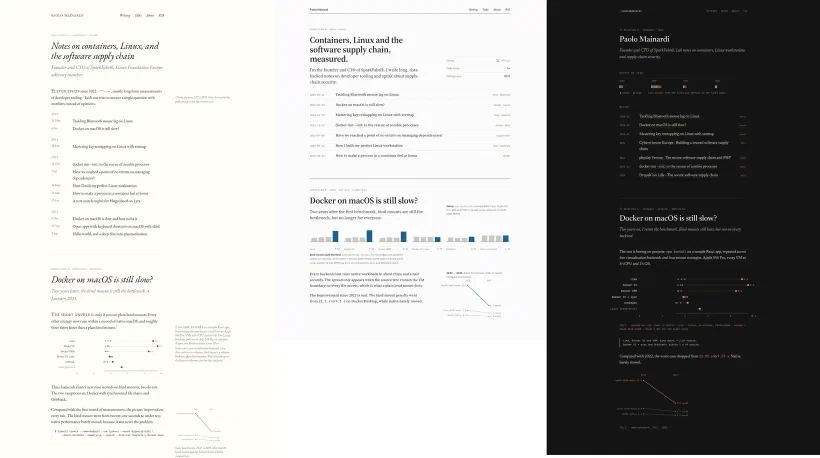
I chose to evolve what I already had rather than replace it, and that became one standalone theme: every template, the stylesheet, the scripts and the fonts in one place, no submodule, no dependency on another theme. On top of it went the Tufte rules:
- One accent. Blush marks what you should look at: links, the current section, the highlighted series. Everything else is ink on paper.
- Notes in the margin. A note no longer sits in a coloured box; its label moves to the outer margin and the text keeps a single hairline.
- Quiet tables. Three rules and no fills, numbers aligned to the right.
- Sidenotes and old-style figures, like a well set book.
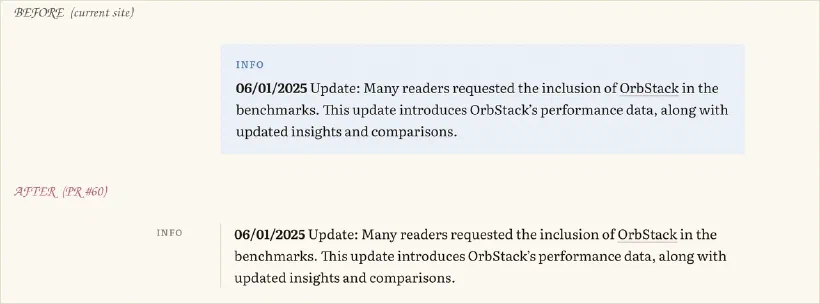
What impressed me most was the quality of the results, and how the process worked. For every change the agent showed me a before and an after, so I could decide what to keep and what to drop. The whole process was entertaining and thoughtful.
Small things came out of it too. Images now open in an overlay when clicked, but only when they would show at least 15% larger, so a screenshot that already fills the column stays where it is.
Charts drawn from data
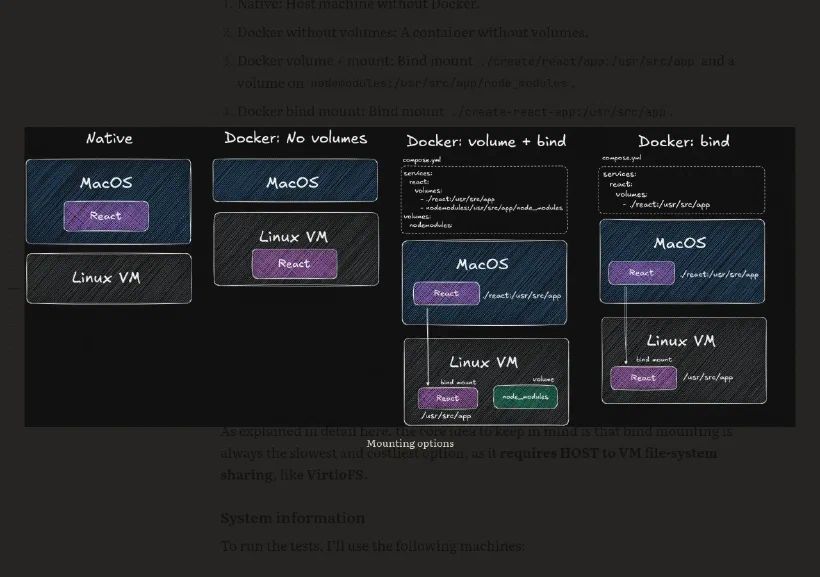
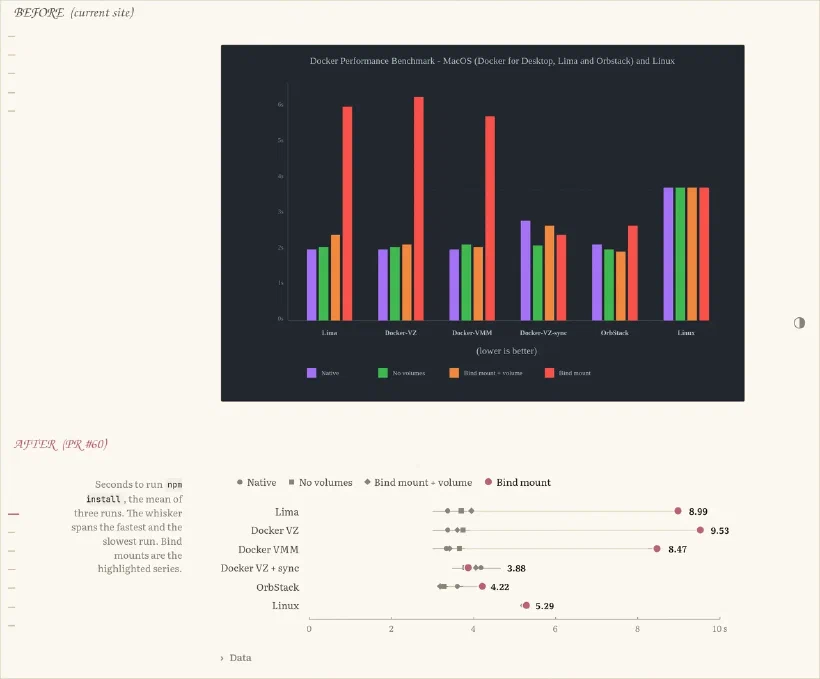
My old benchmark posts used charts exported as images. They looked fine, but the numbers were locked inside a picture: no zoom, no copy, nothing for a screen reader.
Now a post keeps its data in a CSV file next to the text, and a chart shortcode draws it as plain HTML when the site is built: dot plots and bar charts, slopegraphs and small multiples, and sparklines small enough to sit inside a sentence, like the one in the introduction. Every chart ends with its data as a table.
Here is a live one, the 2022 Docker benchmark redrawn as a slopegraph. Each line is one test, from Linux on the left to macOS on the right:
npm install, the same test on Linux and on macOS with Docker Desktop and VirtioFS. Native is faster on macOS, the bind mount three times slower.Data
| test | os | seconds |
|---|---|---|
| Native | Linux | 5.73 |
| Native | macOS | 4.09 |
| Docker | Linux | 5.64 |
| Docker | macOS | 6.80 |
| Docker bind mount + volume | Linux | 6.18 |
| Docker bind mount + volume | macOS | 7.65 |
| Docker bind mount | Linux | 6.81 |
| Docker bind mount | macOS | 21.05 |
The agent also added two things after I asked for “better legends”: a title under the axis that says which way is better, and short notes under labels that mean nothing on their own, like “Docker VZ”. Both follow the same Tufte idea: explain on the chart, not in a legend.
Faster
The site was already fast, so this part was about the long posts. The 2025 Docker post, with its screenshots and tables, was the heaviest page on the site.
The changes are not glamorous: the one script now loads after the page instead of before it, images are served at the width of the column (some originals were close to 8000 pixels wide), the italic font is preloaded on posts, files with a fingerprint in their name are cached for a year, and the browser skips laying out code listings and tables until you scroll near them. The Hugo version went up too, which also fixed a colour shift in dark WebP images.
Measured with Lighthouse on mobile settings, the median of three runs, before and after the changes, on the same machine:
| Docker 2025 post | Before | After |
|---|---|---|
| Performance score | 89 | 93 |
| Largest paint | 3.45 s | 3.15 s |
| Page weight | 570 KB | 407 KB |
The home page was already at 99 and stayed there.
Accessible
I asked for an accessibility analysis, and the agent ran axe-core, the standard automated checker, on every kind of page at two widths and in both colour schemes. The structure was mostly fine. The colour was not: the muted grey I used for dates, captions and labels had a contrast of 3.51:1 on the paper background, below the 4.5:1 that WCAG AA asks for, and it failed on 476 elements across twelve pages.
The fix is a slightly darker grey, 5.16:1, and a slightly deeper blush. Alongside it went a skip link, proper landmarks, a real heading on every page, and wide tables that you can scroll with the keyboard.
To keep it that way, every pull request now runs axe on all 52 pages of the site, in three runs each, and cannot merge with a single violation. It takes about two minutes, so it is skipped for pull requests that only add links.
Safer, in public
The repository is public, so I asked for a security review with that in mind. The good news first: a scan of all 353 commits with gitleaks found no leaked secret. The rest was hardening:
- Actions pinned to commits. Every GitHub Action now runs from a fixed commit instead of a tag that could be moved, and the repository rejects any workflow that is not pinned this way. The deploy job holds the Firebase key, so this matters.
- Least privilege. Workflows run with read-only permissions and do not leave the token on disk.
- Security headers.
nosniff, a strict referrer policy, a closed permissions policy, and no framing, on every response. - Secret scanning with push protection, and Dependabot alerts.
- Housekeeping. An old
.envfile left in the repository is gone, and so is the unused wiki.
The last step is a good example of what these models can do now. The deploy signed in to Google Cloud with a service account key created in 2023 and stored as a GitHub secret: a file that, if leaked, would deploy to my site from anywhere. I asked the agent to replace it with Workload Identity Federation and to check the Firebase docs. It read the documentation of the authentication action, noticed its warning that federation does not work with the Firebase Admin SDK, and explained why the deploy was not affected, since it uses the Firebase CLI. Then it proposed the exact commands, created the identity pool once I said yes, limited it to this repository’s main branch, rewrote the workflow, and kept the old key until the first keyless deploy succeeded. Now no key is stored anywhere: every deploy proves who it is with a token that lasts minutes.
Links, and publishing more often
I save and share a lot of links in our company’s tech channel on Slack. I thought a section for everyone, in my own space, would be useful, and I wanted it to be as simple and automated as possible. We did it: the Links page is a list of things worth reading, each with a short note on why.
Publishing one takes me a few seconds:
- I share the link to a private Slack channel from my phone, with a rough note, often in Italian.
- Once a day a scheduled agent reads the new messages, rewrites my note in clean English without adding anything, takes the title from Slack’s link preview, and opens a pull request.
- A check makes sure the pull request only adds link entries, then it merges itself and the site deploys.
- The agent replies in the Slack thread, saying clearly that it is the agent writing and not me.
The first design I got was faster still: a shortcut on my phone that would publish directly. It also put a token able to publish on my phone, so I said no. This is a good example of what I mean by steering: the model went for the quickest way to the result, and the security boundary was mine to set.
Working with AI agents
For simple stuff like this, reading the code is no longer the point. The frontier models now write more solid code than the average developer, me included. What I do is steer, bring the ideas, test the result, and build the harness that keeps the models inside the limits we agreed on.
On this site the harness is a set of checks that run on every pull request, and all but the link check must pass before it can merge:
- The build, and for link pull requests a check that they only add link entries.
- Accessibility, axe-core on every page of the site.
- Writing style, on the posts a pull request adds or edits: no dashes as punctuation, no marketing words.
- Broken links, every internal link, image and anchor of the built site, with lychee. External links are checked once a week, because other sites break on their own schedule.
- Workflow security, actionlint and zizmor on the GitHub workflows, which hold the deploy key.
- The design system, a lint for
DESIGN.md.
I added the last four after this post was first published: when I want a new rule, I ask an agent for it, and from then on every change has to pass it. At SparkFabrik we go further with sf-agents-harness, our open source catalogue of skills, agents and prompts, so every agent follows the same writing style, commit conventions and rules for GitHub and GitLab.
Steering still matters. Models are built to reach a result quickly, and even if their proposals are much safer than in the past, thanks to reinforcement learning on exactly this, they cannot know your context or the security boundaries you want to keep.
Was anything annoying? Honestly, not much. The process was smooth and simple; the only friction came from a few frontend quirks, and I think more steering or a better frontend harness would remove most of them.
Conclusion
The site is faster, accessible, safer, and it looks the way I wanted it to. More importantly, I do not have to touch it anymore.
What comes next is finding new, creative ways to focus on content: an agent that interviews me about a topic and turns my thoughts into a post, for example, which is more or less how this one was written. The coding part of this site stays entirely in the hands of my agents.
If you have questions or just want to talk about agents and how you use them, just drop me a message here.